
The best Zendesk alternative is the one that matches how your support team already works, not the one that wins a feature comparison. For most teams that means one of seven tools: Gorgias, Help Scout, Freshdesk, Front, HubSpot Service Hub, Zoho Desk, or Salesforce Service Cloud. Which one is right comes down to a single trade-off: how fast you can stand the tool up versus how far you can bend it to your process.
I'll say this up front because it shapes everything below. rethinkCX doesn't resell or implement any of these platforms — we're a vendor-neutral CX advisory, so the only goal here is matching you to the right fit, including the case where the right move is to stay on Zendesk and fix what you have. One disclosure while we're being up front: the Freshdesk link below is an affiliate link, so we may earn a commission if you start a trial through it. It didn't buy Freshdesk its spot or soften a word of the assessment — the ranking and the caveats are the same ones I'd hand a client.
Here's the fast version before the detail.
| Tool | Best for | Time to live | Starts at |
|---|---|---|---|
| Gorgias | Shopify ecommerce | An afternoon | $10/mo (per ticket) |
| Help Scout | Email-led B2B | A few days | ~$25/user/mo |
| Freshdesk | A cheaper Zendesk | A few days | $19/agent/mo |
| Front | Team-based inboxes | Days to weeks | $25/seat/mo |
| HubSpot Service Hub | HubSpot shops | Days to weeks | ~$15–20/seat/mo |
| Zoho Desk | Tight budgets | Days to weeks | ~$14/user/mo |
| Salesforce Service Cloud | Deep customization | Months | $25/user/mo |
Pricing confirmed against each vendor's own pricing page as of June 2026. Treat these as starting points; the section on what Zendesk actually costs explains why headline numbers mislead.
The short answer, and the honest one
The short answer is the table above. The honest answer needs one more step, because the reason a tool feels right or wrong is rarely its feature list. It's whether the tool's defaults match the way your team already handles a ticket. Get that match right and onboarding is quiet. Get it wrong and you spend the next year fighting the software you bought to fix the last one.
First, be honest: have you actually outgrown Zendesk?
This is the question no one selling you a new platform will ask, so I will. A large share of the "we need to leave Zendesk" conversations I've had trace back to one of two things, and neither is solved by switching.
The first is tier bloat. A team buys Suite Professional at $115 per agent per month, uses maybe a third of it, and concludes the tool is expensive and bloated. It is expensive, but the bloat is a purchasing decision, not a product flaw. Dropping to Suite Team, or trimming seats to the people who actually touch tickets, fixes the bill without a migration.
The second is a routing setup that was never finished. Tickets land in the wrong queue, escalations bounce, and the macros are three years stale. Every platform on this page will reproduce that mess faithfully if you carry the same broken rules across. The replatform feels like progress because it forces a reset, but the reset is the thing that helped, not the new logo.
So before you shop, benchmark whether the gap is your platform or your operating model. And if the real problem is speed, most of the response-time levers worth pulling don't require a new tool at all. If you work through both and still hit a wall, the wall is real. Now the alternatives matter.
The real trade-off: speed to set up versus how much you can bend it
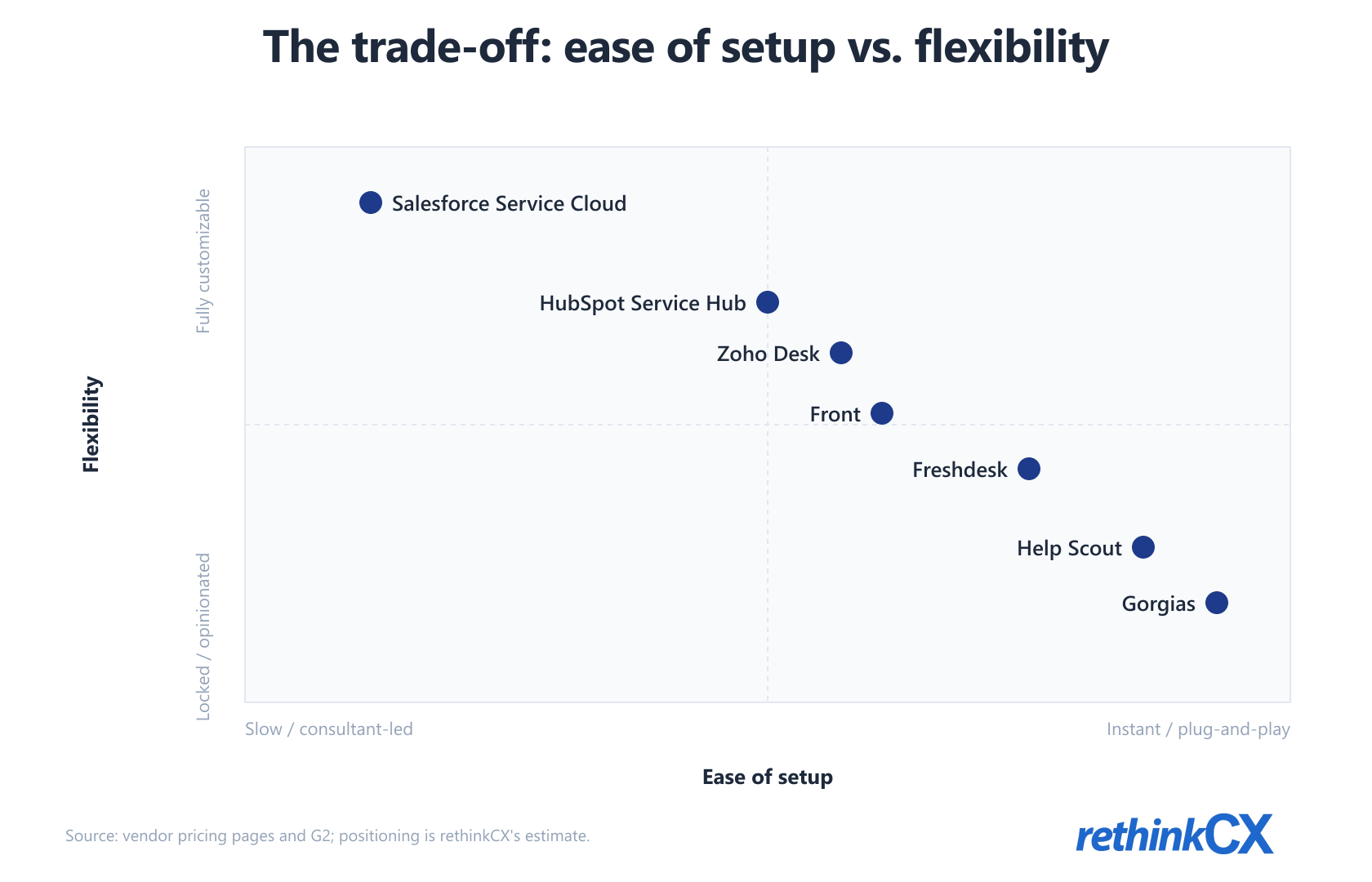
Every tool here sits on one spectrum. On one end, software that gets you live almost instantly because it makes the decisions for you. On the other, software that bends to any process you can design because it makes you build everything yourself. You are always trading one for the other, and the listicles that promise a tool is both easy and infinitely powerful are selling you the marketing, not the reality.
I learned the shape of this trade-off running ecommerce support operations. Gorgias is the clearest case at the easy end. If you're on Shopify, you can have agents working live the same afternoon, with full access to order data, refunds, and cancellations, and no IT ticket to get there. It's genuinely a relief the first time you see it. The catch shows up later, when you want to do something the system wasn't built for. The moment you try to introduce your own workflow or a feature outside its model, Gorgias quietly blocks you. You're playing a game that isn't yours, and the rules don't bend.
Salesforce Service Cloud is the opposite pole, and it's the one I'd point to when a team insists it needs control. The setup is hard enough to turn companies away, and reviewers routinely cite three to six months with a consultant to deploy it properly. But once it's standing, you can tailor it completely. You build the objects, the flows, and the features your operation needs, and Salesforce doesn't tell you how to run support. Everything else in this guide falls somewhere between those two poles.
One more thing the spectrum hides: these tools don't even price on the same unit. Most charge per seat. Gorgias charges per ticket. That single difference can flip which tool is cheaper for your volume, which is why comparing sticker prices is close to meaningless until you map the model to your own ticket shape.
The seven alternatives, placed on the spectrum
I've ordered these from the easy-setup end toward the high-flexibility end. For a wider field beyond help desks, our broader rundown of customer service software covers adjacent categories.
Gorgias: the Shopify-native fast lane
If you run a Shopify store, Gorgias is the most frictionless option on this list. It plugs into Shopify, Klaviyo, and a couple hundred other apps, surfaces order and refund actions right in the ticket, and gets a team productive almost immediately. Pricing is per ticket, not per seat: plans start at $10 a month for 50 tickets and climb to $360 a month for the 2,000-ticket Pro tier where most growing stores land. Watch the overage and AI-interaction charges, which stack on top. The trade-off is rigidity. Outside its ecommerce lane, you'll hit walls you can't move. Best for: Shopify-first ecommerce that values speed over control.
Help Scout: email support without the help-desk weight

Help Scout does one thing deliberately well: a shared inbox that feels like an upgraded version of email rather than a ticketing system. There's almost nothing to configure, which is the point. A small B2B team is live in a few days. Pricing starts around $25 per user per month. It won't satisfy a team that wants deep automation or heavy customization, and it isn't trying to. Best for: email-led B2B support teams that want simplicity over knobs.
Freshdesk: the closest like-for-like, priced lower

Freshdesk is the most direct Zendesk substitute here. Multichannel ticketing, a knowledge base, automation, and reporting in a familiar shape, at a lower price. Plans start at $19 per agent per month, with a free tier for one to two agents, and scale to $89 per agent for Enterprise. If you like the Zendesk model and just want it to cost less and feel a little lighter, this is the safe swap — and a free Freshdesk trial is the cheapest way to confirm the shape fits before you commit a migration to it. Best for: teams that want the Zendesk shape without the Zendesk bill.
Front: a shared inbox built for teamwork
Front blends email, social channels, and ticketing into one inbox designed around teams handling conversations together, with comments and assignments built in. It's more configurable than Help Scout and reads less like a traditional help desk. Pricing starts at $25 per seat per month and runs to $105 at the Enterprise tier. Setup is a step up from the plug-and-play tools but still measured in days to a couple of weeks. Best for: teams that collaborate on the same conversations rather than working tickets in isolation.
HubSpot Service Hub: support that lives in your CRM
If your team already runs on HubSpot, Service Hub is the natural pick because support tickets read from the same contact record as marketing and sales. It's genuinely customizable in-house, with custom objects, fields, and rules you can build without a consultant. Pricing starts low, around $15 to $20 per seat, but the Professional tier jumps to $90 per seat and carries a one-time onboarding fee, so the real cost lands higher than the entry number suggests. The deflection upside is real if you also invest in self-service and a solid knowledge base. Best for: teams already standardized on HubSpot.
Zoho Desk: the budget multichannel workhorse

Zoho Desk gives you the full multichannel help-desk feature set at the lowest price of this group, roughly $14 to $40 per user per month depending on tier, with a free three-user plan. It's deepest if the rest of your stack is already Zoho. It's more configurable than the plug-and-play tools and cheaper than almost everything, though the interface can feel busy. This is also where it helps to know which support metrics actually tell you whether the tool is the problem before you commit. Best for: cost-sensitive teams that need real multichannel coverage.
Salesforce Service Cloud: total control, at a price
Salesforce is the high-flexibility pole. You can model any support process you can describe, build custom features, and integrate it with everything, which is exactly why large or complex operations choose it. The cost is the implementation: months of work, usually with a consultant, before it's running well. Editions run from $25 per user for Starter to $165 for Enterprise and beyond, before add-ons and Agentforce. This is also the platform where teams most often pay for a tier and add-ons they only half-use, because no one mapped the license to the actual operation. Best for: large teams that need deep customization and have the runway to build it. For a sense of where heavier AI earns its place in support, this is the tier where it tends to show up first.
If your real question is whether to keep this in-house at all, that's a different decision, and the in-house versus outsourced comparison is the better starting point.
What Zendesk actually costs in 2026
The cost story is the most common reason teams start looking, and it's worth getting exact. Zendesk's published pricing runs $19 per agent per month for Support Team, $55 for Suite Team, and $115 for Suite Professional, all on annual billing. That part is transparent.
The part that surprises people is AI. Zendesk's Copilot add-on is another $50 per agent per month, and its AI agents bill on automated resolutions, meaning you pay per ticket the AI closes without a human. The model is defensible, you only pay for outcomes, but it makes the monthly bill a moving target rather than a fixed seat cost. As channels, automation, and volume grow, so does the number, which is precisely the unpredictability that pushes teams to look elsewhere.
The honest takeaway isn't that Zendesk is overpriced. It's that the alternatives bill differently, and "cheaper" depends entirely on your volume shape. A per-seat tool is cheaper for a small team with high ticket volume per agent. A per-ticket tool like Gorgias is cheaper for a lean team with manageable volume, and brutal during a seasonal spike. Map the pricing model to your own pattern before you trust any headline number. If you measure support quality with CSAT, NPS, and CES, hold the cost change against those, not against the sticker price alone.
Migrating off Zendesk without breaking support
If you've ruled out the cheaper fixes and picked a destination, the migration itself is usually the smallest part. For most small and mid-size teams it runs two to four weeks. Every vendor here offers import tools that move tickets, contacts, and knowledge base articles automatically, so the data isn't the hard part.
The work is in the rebuild. Automations, routing rules, SLAs, and macros don't transfer cleanly, and you shouldn't want them to, because carrying over the old logic carries over the old problems. Treat the migration as the routing reset you've been putting off. Rebuild the rules around how support actually flows today, not how it flowed when someone last touched the config. Conversational AI and where automation genuinely helps is also easier to get right on a clean setup than bolted onto inherited rules.
One practical sequence: stand up the new tool in parallel, move one channel over first, run both for a week, then cut the rest once routing holds. The teams that break support during a migration are almost always the ones that flip everything at once.
The one-line take
Don't shop for the best Zendesk alternative. Shop for the tool that matches how your team already works and how much you're willing to build. Gorgias if you want speed and live on Shopify, Salesforce if you want control and can afford the build, and one of the five in between if you want a sensible balance. For a vendor-neutral read on how the whole stack fits together, that's the work our CX technology advisory focuses on.